For Shopify merchants · v2.4

Bulk edit metaobjects like a spreadsheet.

Structa turns Shopify's one-at-a-time metaobject editor into a fast, spreadsheet-style table. Edit 500 rows in the time it used to take to edit five. No setup, no CSV gymnastics.

⌘S saves everything 5,000 rows / table Zero setup
admin.shopify.com/apps/structa/bulk-editor
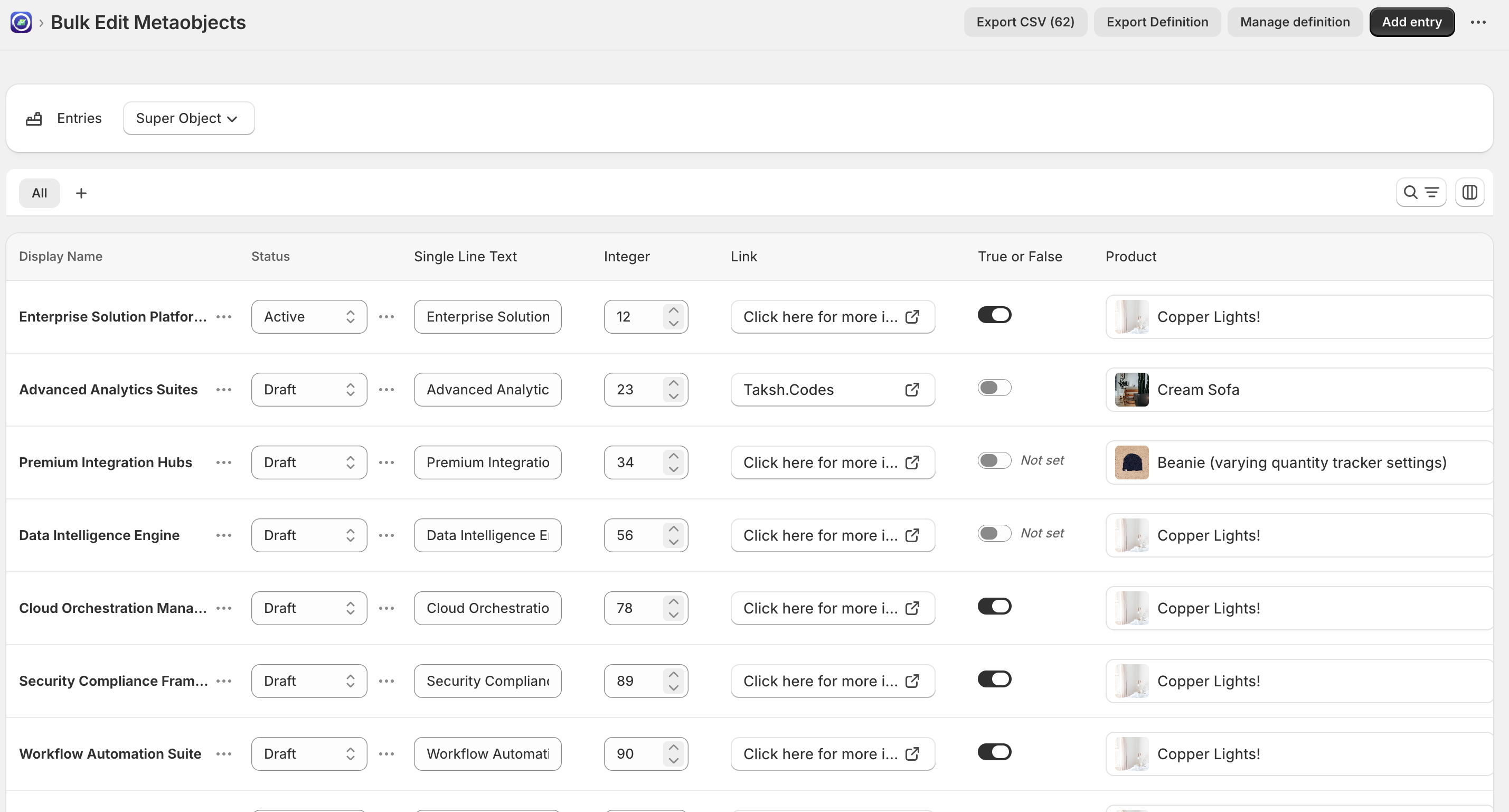
Structa bulk editor showing a spreadsheet of metaobject entries
The product · 01 — 03

Three tools.
One tab in your admin.

Structa ships the three workflows every merchant eventually wishes Shopify had: bulk editing, definition portability, and an AI review queue for agent-driven changes.

01 — Bulk editor

Edit a whole definition in one go.

Click any cell, type, tab to the next. Filter, sort, paste ranges, undo. When you're done, press ⌘S and Structa submits every change in a single batch — keeping failed rows editable so nothing silently disappears.

  • 42 field types — text, refs, files, money, JSON, listscore
  • Search, filter (1–50 unique values), saved viewscore
  • Keyboard nav: Tab, ⌘/Ctrl+arrows, ⌘S, ⌘Fcore
  • Loads up to 5,000 entries per table viewpro
Read the bulk-editor docs →
structa/bulk-editor
Bulk editor table Fig. 01
02 — Portability

Ship a definition across stores in seconds.

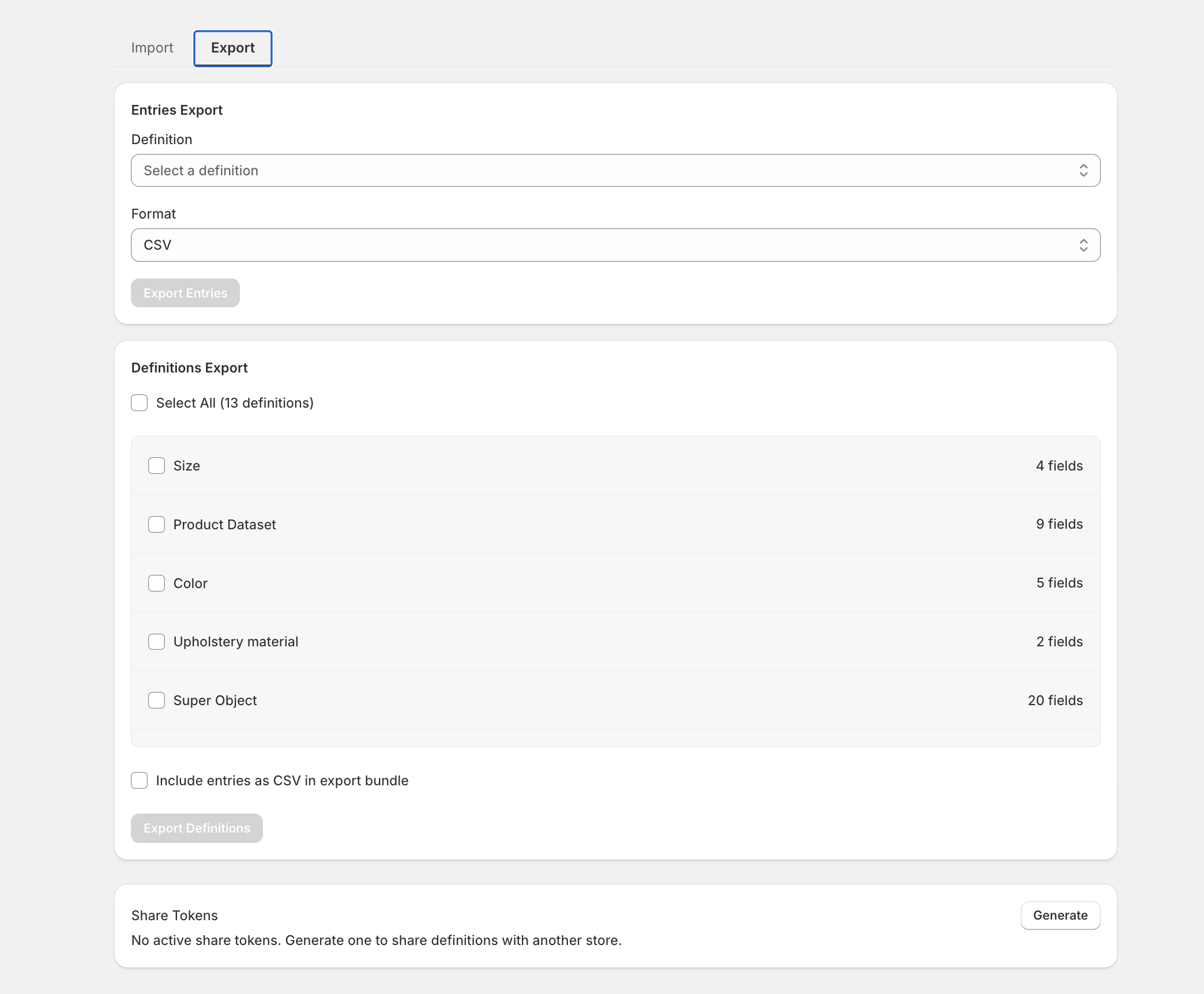
CSV for entries. JSON for definitions. Share tokens for pulling a definition straight from another store. Three paths in, three paths out — pick the one that matches how the data's already shaped.

  • CSV import — upsert by handle, 250 rows / 5 MB per filein
  • JSON definitions — full structure, fields & validationsin · out
  • Share tokens — pull definitions from another store, no filelive
  • Bundle export — pick definitions, include entries, one downloadout
Read the portability docs →
structa/export
Structa export screen with entries, definitions, and share tokens Fig. 02
02a — Three ways in

Bring data from anywhere.

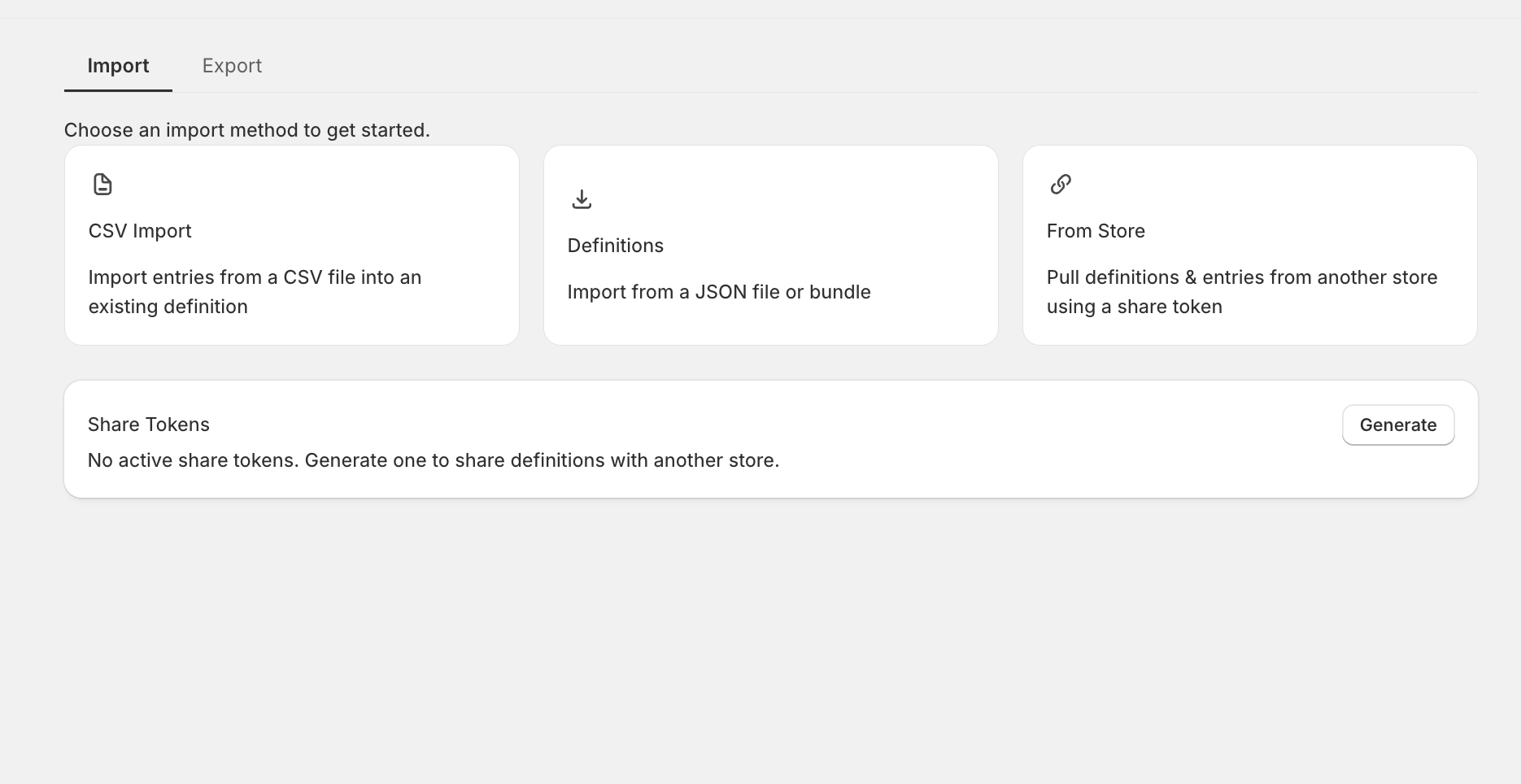
Structa meets your data where it already lives — a spreadsheet on someone's desktop, a JSON file from a dev, or a live store across the room. Pick the source; Structa handles the reconciliation.

  • CSV import into an existing definitionfile
  • JSON — definitions or full bundlesfile
  • From Store — pull via a share tokenlive
Start importing →
structa/import
Structa import screen with CSV, Definitions, and From Store options Fig. 02a
03 — AI via MCP

Let Claude draft changes. You approve.

Wire Structa into Claude with a scoped MCP token. The model reads your data, drafts edits, and drops them into a Review Queue with side-by-side diffs. Nothing touches your store until you hit Approve.

  • Read + propose only — no agent can write directlysafe
  • Review Queue with side-by-side diffs, bulk approvepro
  • Tokens with 30 / 90 / 365-day expiry, hashed at restpro
  • Instant revocation cuts the agent off mid-sessionsafe
Read the MCP docs →
structa/review-queue
Product data review Fig. 03
In the wild

Six places merchants
reach for Structa.

Any metaobject type you've modeled works automatically. These are the patterns we see most often — if you're doing any of them in a Shopify form, stop.

A / 01

Product Bundles

Edit bundle components, tiers, and pricing across every bundle in one table instead of clicking into fifty product pages.

~40 min saved / week
A / 02

Size Charts

Add rows, edit measurements in cm and in, and republish an entire collection's sizing in one save.

~2 hrs saved / season
A / 03

Content Libraries

FAQs, help articles, brand stories as structured data. Rich text, links, images — all in one grid.

For content teams
B / 01

Store Locators

Update addresses, hours, and phone numbers for every location without ever opening a location template again.

Multi-region retailers
B / 02

Badges & Labels

Rotate sale, new-arrival, and custom badges at scale — flip dozens of entries in seconds for launches.

Launch-week favorite
B / 03

Any Custom Data

Team profiles. Testimonials. Specs. Recipes. Whatever definition you've invented — Structa reads it.

Everything else
Setup · under 60 seconds

No migrations. No mapping.
Just install.

Structa reads the definitions you've already built in Shopify. There's nothing to re-model, nothing to import. Add it, open a definition, start editing.

01

Install

Add Structa from the Shopify App Store. No configuration — the app reads your metaobjects the moment it boots.

One click
02

Pick a definition

Everything you've modeled shows up on the home screen. Click any definition to jump into its bulk editor.

Auto-detected
03

Edit inline

Tab through cells, paste ranges, filter and sort. Keyboard shortcuts through the whole app.

Tab⌘F
04

Save once

⌘S submits every edit together. Partial failures stay in the editor so you can fix and retry without losing work.

S
The math

Hours on Friday.
Minutes on Tuesday.

A realistic workflow: 50 entries, updating two fields each, with a publish at the end. Timed with a stopwatch, not a spreadsheet.

Without Structa
2h 04m

Click entry → wait → edit → save → back → repeat. Fifty times. Coffee by entry twelve.

With Structa
4m 38s

Open the table, tab through, ⌘S. The rest of the afternoon is yours.

96%
Time reclaimed
1 req
Instead of 50 round-trips
0
Tabs opened
Pricing

Free until
you've outgrown it.

Two tiers. No seat math, no call-us-for-enterprise, no hidden add-ons. Billed through Shopify, cancellable any time.

Free forever

Starter

$0 / month

For solo merchants kicking the tires.

  • 3 metaobject definition types
  • 5 entries per definition
  • Bulk editor + CSV export
  • Standard support
Install free
Most merchants
Pro

Pro

$8 / month

For teams shipping bundles, size charts, and launches every week.

  • Unlimited definitions and entries
  • Bulk editor handles 5,000 entries per view
  • CSV + JSON import/export & cross-store share tokens
  • AI / MCP integration + Review Queue
  • Duplicate-entries tool · priority support
  • 14-day free trial
Get Pro

Billed through your Shopify account. Cancel from the Plans page in the app.

FAQ · 01 — 08

Questions we've
actually been asked.

01Do I need to set anything up before using Structa?

No. The app reads every metaobject definition in your store the moment it boots. If you've already modeled things in Shopify, they'll be in the sidebar the first time you open Structa.

02Which field types are supported?

42 of Shopify's 52 field types — text (single, multi-line, rich text), integer, decimal, date, date & time, boolean, color, rating, money, link, URL, ID, JSON, weight/volume/dimension, all reference types (product, variant, collection, customer, page, file, metaobject, mixed, taxonomy), choice lists, and list variants of each. The remaining 10 (article reference, company reference, and a few list types) show read-only and edit through the Shopify admin.

03How does saving many edits at once work?

One ⌘S (or Ctrl+S on Windows/Linux), one submit. Structa sends every edited row together — there's no per-save row cap. Rows that fail validation stay in the editor marked as still-edited so you can fix them and retry; successful rows commit immediately so you never lose work.

04What's the AI / MCP integration?

MCP (Model Context Protocol) lets you point Claude — or any MCP-aware agent — at Structa using a scoped token (30, 90, or 365-day expiry). The agent can read your data and propose changes; it has no path to write directly. Proposals land in the Review Queue with side-by-side diffs and bulk approve/reject. Tokens are stored as SHA-256 hashes and can be revoked instantly.

05Is my data safe?

Yes. Structa is GDPR and CCPA compliant. No changes are applied without explicit action; agent proposals always require manual approval; tokens are scoped and revokable instantly.

06How big can an export or import be?

CSV export covers what's on screen, up to the 5,000-row table view and respecting active filters. CSV import handles 250 rows and 5 MB per file; rows with a handle upsert (update if present, create if not), rows without one create new with an auto-generated handle. JSON exports for definitions have no row cap (schema only).

07Can I copy a definition to another store?

Two ways. Export the definition as JSON in store A and import it into store B — or generate a share token in store A and paste it into store B's import flow to pull the definition live, no file involved. Either path moves the structure (fields, validations, settings); entries move separately via CSV if you want them too.

08Can I cancel?

Any time, from the Plans page inside the app. Your store falls back to the free tier (3 definitions, 5 entries each); your metaobjects and data all stay in Shopify. Billing is handled through your Shopify account.
The friction ends here

Edit the whole thing. Once.

Install Structa, open any definition, and do in three minutes what Shopify's default editor wants you to spend a morning on.